A320 FMGS and MCDU
The Flight Management and Guidance System (FMGS) of the Airbus A320 is the set of two flight management guidance computers, two MCDUs, the flight control unit and two flight augmentation computers that plans the flight, computes the aircraft's position and predictions, and guides it through the autopilot, flight directors and autothrust.
The Flight Management and Guidance System (FMGS) is the part of the Airbus A320 that knows where the aircraft is, where it is going and how it should get there. It holds the flight plan, computes the aircraft's position, predicts times, fuel and altitudes, and turns all of this into commands for the autopilot, the flight directors and the autothrust. The crew work with it through two Multipurpose Control and Display Units (MCDUs) on the pedestal and through the Flight Control Unit (FCU) on the glareshield.
Almost every phase of a normal flight starts with an MCDU entry or an FMS prediction, and the limitations on managed navigation depend on the accuracy the FMGS can show. The guidance modes it drives are described in A320 auto flight: FCU and AP/FD modes, the general principles in flight management system.
- FMGS architecture: FM and FG
- FMGC operating modes
- The MCDU: keys, scratchpad and colour coding
- Initialisation and performance pages
- Flight plans: active, temporary, secondary
- Position computation and navigation accuracy
- Radio navaid tuning
- FMS flight phases and pseudo-waypoints
- Fuel prediction and progress monitoring
- Back-up navigation
- Frequently asked questions
FMGS architecture: FM and FG
The FMGS consists of two Flight Management Guidance Computers (FMGCs), two MCDUs (a third is optional), one FCU and two Flight Augmentation Computers (FACs). Each FMGC is divided into two parts:
- Flight Management (FM): navigation, flight planning, predictions and the management of displays.
- Flight Guidance (FG): the commands for the autopilot (AP), the flight director (FD) and the autothrust (A/THR).
The FACs look after the yaw axis and the flight envelope, including the characteristic speeds on the PFD (see A320 characteristic speeds).
Managed guidance follows targets computed by the FMS from the flight plan; selected guidance follows values the crew set on the FCU. Selected guidance always has priority.
The FMGCs carry a navigation database which the airline updates every 28 days. Loading it takes 20 minutes, or 5 minutes when it is crossloaded from the other FMGC. Each FMGC can also store crew-defined elements: up to 20 waypoints, 10 runways, 20 navaids and 5 routes.
FMGC operating modes
The FMGS has four modes of operation.
| Mode | When it applies | What it means |
|---|---|---|
| Dual | Normal operation | Each FMGC makes its own computations; they exchange data over a crosstalk bus, one acting as master, the other as slave |
| Independent | Automatic, for example when the FMGCs hold different navigation databases | INDEPENDENT OPERATION on both MCDU scratchpads and the IND light on the MCDU |
| Single | Automatic when one FMGC fails | The remaining FMGC drives both flight directors and receives every MCDU entry |
| Back-up navigation | Selected by the crew after both FMGCs fail | See the last section |
Independent mode caused by different databases lasts until the crew crossload one. Airbus does not recommend pulling an FMGC circuit breaker to force single mode.
In dual mode the master FMGC depends on what is engaged. With both APs engaged, FMGC 1 is master whatever the order of engagement. With one AP engaged, the FMGC on that side is master. With no AP, FMGC 1 is master if the FD 1 pushbutton is on, and FMGC 2 if FD 1 is off and FD 2 on. With no AP and no FD, the autothrust is controlled by FMGC 1.
The MCDU: keys, scratchpad and colour coding
Each pilot has an MCDU on the pedestal. Its screen has six line select keys on each side (1L to 6L, 1R to 6R) and a scratchpad on the bottom line, where typed entries wait to be placed in a field and the system writes messages such as INDEPENDENT OPERATION. Below the screen are page keys, among them INIT, F-PLN, PERF, PROG, DIR, RAD NAV, FUEL PRED, SEC F-PLN, DATA and MCDU MENU, and a full keyboard. PROG shows the progress of the flight and DATA the database and sensor pages. The MCDU also serves other systems, notably the datalink (see A320 communications and datalink).
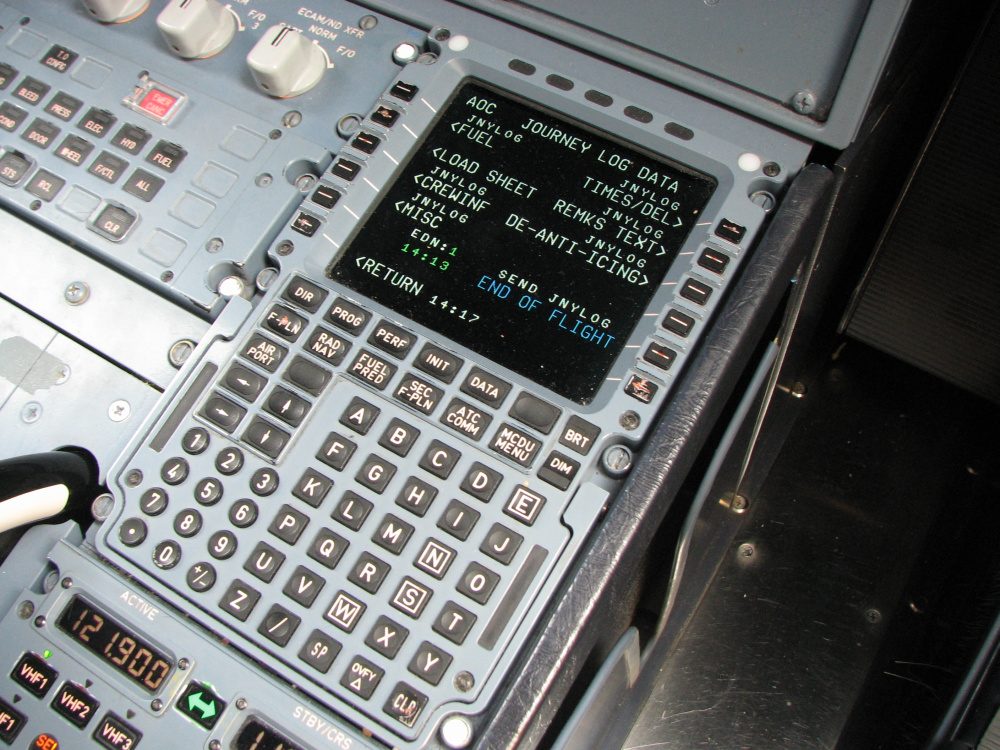
MCDU colour coding tells the crew what they may change:
| Display | Meaning |
|---|---|
| Boxed field | Must be filled |
| Blue | Entry permitted |
| Green | Data generated by the FMS; cannot be changed |
| Magenta | Limits (altitude, speed or time) the FMS will attempt to meet |
| Yellow | Temporary flight plan |
| Amber | Important item requiring immediate action |
| Small font | Data computed by the FMS |
| Large font | Data entered manually |
Exam tip: blue means you may enter data; green means the FMS computed it and you cannot change it.
Initialisation and performance pages
The INIT pages hold the city pair, cost index, cruise level, weights and fuel. INIT A comes first; entering or modifying the origin (FROM) or the company route (CO RTE) resets the INIT coordinates to the airport reference point; the crew may modify them, and gate coordinates are the most appropriate for initialising the IRS position. INIT B takes the expected zero fuel weight and its centre of gravity (ZFW, ZFWCG) and the block fuel, which start the flight plan computation; the fuel figures are checked against the flight preparation. Airbus advises against filling INIT B straight after INIT A: the FMGS would start computing predictions and slow the remaining entries. After engine start INIT B is no longer available, and weight or fuel changes are made on the FUEL PRED page. When the PF has finished the FMGS preparation, the PM checks the entries page by page in the same order.
Pressed on the ground, PERF calls the PERF TAKE OFF page: V1, VR and V2, the FLEX take-off temperature, the flap and THS setting, and the thrust reduction and acceleration altitudes. These default to 1,500 ft or a value set by airline policy, and may be changed, for example for noise abatement. The engine-out acceleration altitude must be at least 400 ft above the airport, give a net flight path 35 ft above obstacles and respect the maximum time for take-off thrust. V2 matters to guidance: without it, SRS does not engage at take-off and V/S engages 5 s after lift-off instead.
The other MCDU PERF pages follow the flight. During the initial climb the PF's MCDU shows PERF CLB, which also gives the time and distance to the FCU altitude at green dot speed. PERF CRUISE holds the cruise altitude used by the cruise altitude mode. PERF DES is where the approach phase can be activated, and the approach (APPR) page shows VREF, 1.23 times the stall speed in CONF FULL, when a CONF FULL landing is planned. The FMGC also computes VAPP from VLS and the tower headwind.
Flight plans: active, temporary, secondary
The active flight plan (F-PLN) is the one followed in NAV and in the managed vertical modes. Lateral revisions, such as a departure, an arrival, a hold or an offset, are called from the left line select key beside a waypoint, and vertical revisions, such as speed, altitude, time or wind, from the right key. A revision first appears as a temporary flight plan, in yellow, and replaces the active one only when the crew insert it. Constraints appear in magenta. Altitude constraints are respected only in managed climb or descent; OP CLB, OP DES, V/S and the expedite modes disregard them. At a flight plan discontinuity NAV reverts to HDG or TRK.

The secondary flight plan (SEC F-PLN) guides nothing until it is activated. It serves for alternatives and uplinks: when the scratchpad shows AOC SEC F-PLN UPLINK, the crew select AOC F-PLN INSERT on the SEC INDEX page to place the airline's route in the secondary for review. A route clearance received by datalink can likewise be loaded into the secondary, checked and, once the crew have answered WILCO, activated.
Position computation and navigation accuracy
The aircraft has two GPS receivers, either separate units or built into the multi-mode receivers (MMRs). They feed the ADIRUs, each of which computes a hybrid GPS-inertial position, and the FMGCs use this hybrid position. GPS 1 supplies ADIRUs 1 and 3, GPS 2 supplies ADIRU 2, and if one receiver fails all ADIRUs use the other.
GPS PRIMARY governs the accuracy checks: while it is available on approach, no navigation accuracy monitoring is required. If GPS PRIMARY LOST is displayed on the ND and the MCDU, or no GPS is fitted, the crew check on the PROG page that the accuracy suits the phase of flight. With the appropriate RNP checked or entered and HIGH accuracy displayed, the navigation remains good enough for RNP operations. With LOW accuracy on approach, at least one ND must show raw data in ROSE LS or ROSE VOR. When the FMGC detects low accuracy, the enhanced terrain functions of the EGPWS are deactivated, while the five basic GPWS modes remain.
The FCOM limitations give the navigation accuracy (RNP) available with GPS PRIMARY:
| Phase | AP on | AP off, FD on | AP off, FD off |
|---|---|---|---|
| En route | 1 NM | 1 NM | 1.1 NM |
| Terminal area | 0.5 NM | 0.51 NM | 0.51 NM |
| Approach | 0.3 NM | 0.3 NM | 0.3 NM with F-LOC deviation displayed |
NAV may be used after take-off if GPS PRIMARY is available or the crew have checked the FMGS take-off updating. In the terminal area it needs GPS PRIMARY, or HIGH accuracy with the RNP checked, or a cross-check of the FMS navigation against navaid raw data. An RNAV (GNSS) approach requires GPS PRIMARY. RNP AR capability down to 0.3 NM has been demonstrated with the AP on. See FMS navigation and position updating and RNP approaches.
If the IRS and FMGC positions differ by 5 NM or more on the POSITION MONITOR page and a full alignment is not needed, a fast alignment is performed. At the parking stand the PM checks on the same page that the IRS deviation is within the published limits.
Radio navaid tuning
There are three tuning modes. In automatic tuning (navaid auto-tuning) each FMGC tunes its own navigation receivers; if one FMGC fails, the other tunes both sides' receivers. In manual tuning the crew use the MCDU, on the RAD NAV page, to select a particular navaid for display; this does not affect the FMGC's own automatic function. Back-up tuning through the radio management panels is used when both FMGCs have failed. Without GPS PRIMARY, an approach based on radio navaids requires the reference navaid and the airborne receiver to be serviceable, tuned and monitored.
FMS flight phases and pseudo-waypoints
The FMS flight phases, such as take-off, climb, cruise, descent, approach and go-around, are different from and independent of the ten flight phases of the flight warning computers. They change what the FMGS does: CLB, for example, reverts to OP CLB when the phase changes to descent or approach, and DES can engage only in the cruise, descent or approach phase.
The top of descent is computed backwards from a point at 1,000 ft on final at VAPP, taking the descent speed and altitude constraints into account and assuming managed speed. A descent started early in DES is flown at 1,000 ft/min until the profile is regained.
Approach phase activation is automatic when the aircraft overflies the DECEL pseudo-waypoint, a point computed on the flight plan, with NAV engaged. In HDG or TRK the crew activate and confirm the approach phase on the PERF DES page about 15 NM from touchdown. The go-around phase activates when the thrust levers are set to TOGA with the flaps lever not at 0; with the flaps lever at 0, the FMS does not engage it.
The flight plan's speed limit (SPD LIM) and constraints are disregarded in the expedite modes.
Fuel prediction and progress monitoring
The predictions are only as good as the data. At cruise level winds and temperatures are entered at waypoints where the wind differs by 30° or 30 kt, or the temperature deviation by 5 °C, to keep the fuel and time predictions accurate. The FMGC also uses the static air temperature, derived from the heated TAT probes, for the ISA deviation; an iced probe would corrupt the predictions.
The PROG page monitors the flight. Its recommended maximum flight level (REC MAX FL, written MAX REC FL in some documents) gives at least a 0.3 g buffet margin. The FMGS will accept a cruise level above it, provided the margin is not reduced below 0.2 g. In alternate or direct law at high altitude, descending about 4,000 ft below the recommended maximum markedly reduces the risk of a stall warning in turbulence.
Back-up navigation
If both FMGCs fail, the crew select BACK UP NAV on the MCDU MENU page. The MCDU then uses its own memory and the IRS or GPS position to keep a flight plan, display it on the ND, sequence it automatically and allow limited revisions. There is no AP/FD NAV mode, and the autothrust needs at least one FMGC to arm. The navaids, normally tuned by the FMGCs, are tuned on the radio management panels, whose NAV key takes control of the receivers.
Frequently asked questions
What is the difference between FM and FG in the A320 FMGC?
Each of the two flight management guidance computers has two parts. Flight Management (FM) handles navigation, the flight plan, the predictions of time, fuel and altitude, and the displays. Flight Guidance (FG) produces the commands for the autopilot, the flight directors and the autothrust. Managed guidance means the FG follows targets computed by the FM; selected guidance means it follows values the crew set on the FCU.
What are the four FMGS modes on the A320?
Dual mode is normal: both FMGCs compute, exchange data over a crosstalk bus and work as master and slave. Independent mode occurs, for example, when the two computers hold different navigation databases, and shows INDEPENDENT OPERATION on the MCDUs. Single mode follows the failure of one FMGC. Back-up navigation is selected on the MCDU MENU page after both FMGCs have failed and gives no AP/FD NAV mode.
What do the colours on the A320 MCDU mean?
Boxed fields must be filled. Blue fields show that an entry is permitted, while green shows data generated by the FMS that cannot be changed. Magenta marks limits of altitude, speed or time that the FMS will try to meet, yellow marks a temporary flight plan and amber an item that is important and needs immediate action. Small characters are computed by the FMS, large ones were entered by the crew.
When must the crew check navigation accuracy on the A320?
While GPS PRIMARY is available no navigation accuracy monitoring is required. If GPS PRIMARY LOST is displayed, or the aircraft has no GPS, the crew check on the PROG page that the accuracy suits the phase of flight, with the appropriate RNP checked or entered. HIGH accuracy then still allows RNP operations. With LOW accuracy on approach, at least one ND must show raw data in ROSE LS or ROSE VOR.
How is the approach phase activated in the A320 FMS?
If the aircraft overflies the DECEL pseudo-waypoint with NAV engaged, the approach phase activates automatically. If the aircraft is being flown in HDG or TRK, the crew activate and confirm the approach phase on the PERF DES page, about 15 NM from touchdown. The approach phase must be active before the FINAL APP mode can engage on a non-precision approach.
Test yourself on A320 FMGS and MCDU
The v1prep banks cover this topic in the A320 type-rating bank, with a worked explanation for every answer. EASA ATPL, PPL, IR and CPL, the FAA written tests and A320/B737 type ratings.
Start practising →Sources and further reading
- EASA Type Certificate Data Sheet EASA.A.064, Airbus A318, A319, A320, A321
- JAA Joint Operational Evaluation Board Report A320 (2003), as published by EASA in the A320 OSD transition documents
- EASA Easy Access Rules for Large Aeroplanes (CS-25), CS 25.1329 and AMC 25.1329, Flight guidance system
- EASA, Explanatory Note to ED Decision 2019/011/R (CS-ACNS Issue 2, PBN)
- FAA Aeronautical Information Manual, Chapter 1 Section 2, Performance-Based Navigation (PBN) and Area Navigation (RNAV)
- EASA, Explanatory Note to ED Decision 2018/001/R, Part-FCL theoretical knowledge learning objectives (022 Instrumentation)
Library articles are written for study and exam preparation. They do not replace your aircraft's approved documentation, your operator's procedures or the regulations themselves.