A320 Cabin Systems and CIDS
The Cabin Intercommunication Data System (CIDS) of the Airbus A320 is the computer system that controls the cabin functions, among them the cabin and service interphones, the passenger address, the lighted signs and cabin lighting and the evacuation signalling, through two directors and decoder/encoder units installed along the cabin.
The Cabin Intercommunication Data System (CIDS) runs the A320 cabin. It carries the interphone between the cockpit and the attendant stations, the passenger address (PA), the lighted signs and the cabin lighting, the call and evacuation signals, and on some aircraft the smoke detection of the lavatories and cargo holds. The cabin crew control it from their panels; the flight crew reach it through the CALLS panel, the SIGNS switches, the CAB and PA keys of their audio control panels, and the passenger system pushbuttons on the overhead panel.
Cabin systems are rarely the subject of an emergency, but the calls, chimes and signs are the language of every normal flight between cockpit and cabin, and an emergency call or an evacuation command must be recognised at once. The radio side of the audio system is described in A320 communications and datalink.
CIDS architecture
The CIDS handles the cabin and service interphones, the PA, the lighted signs, reading lights and general illumination, the emergency evacuation signalling, lavatory smoke, passenger entertainment, slide bottle pressure, the vacuum system and, depending on the installation, cargo and lavatory smoke detection. It does not handle the VHF and HF radios.
Its main components are two CIDS directors, connected in parallel, one active and the other on standby. They are linked to decoder/encoder units (DEUs) of two types:
| DEU | Installed | Connected equipment |
|---|---|---|
| Type A, for passengers | Along the cabin | Loudspeakers, lighted signs, call buttons, call lights, general illumination ballast units |
| Type B, for attendants | Near the exit doors | Area call panels, smoke detectors, attendant handsets, slide and door pressure sensors, attendant indicator panels |
How the cabin reacts to some events depends on how the CIDS is programmed (the FCOM speaks of CIDS/CAM programming): whether the cabin lights come on with the signs at high cabin altitude, for example, or whether a chime sounds when a sign changes.
Some aircraft use the smoke detection function (SDF) of the CIDS instead of a separate smoke detection control unit (SDCU). A lavatory detector, in the air extraction duct, signals the CIDS, which passes the alarm to the flight warning computer for warnings in the cockpit and the cabin; the cargo smoke detectors likewise report through it to the ECAM.
Forward attendant panel
The cabin crew work from the forward attendant panel (FAP). From it, in cruise, they can adjust each cabin zone temperature selected from the cockpit within ±2.5 °C (±4.5 °F). It also carries the PED power switch, with which the cabin crew can cut the in-seat power supply. A LIGHT EMER pushbutton on the purser's panel can switch on the emergency lighting whatever the position of the cockpit EMER EXIT LT switch.
Before landing, the flight crew check CABIN READY on the engine/warning display or obtain the cabin report from the purser.
Cockpit CALLS panel
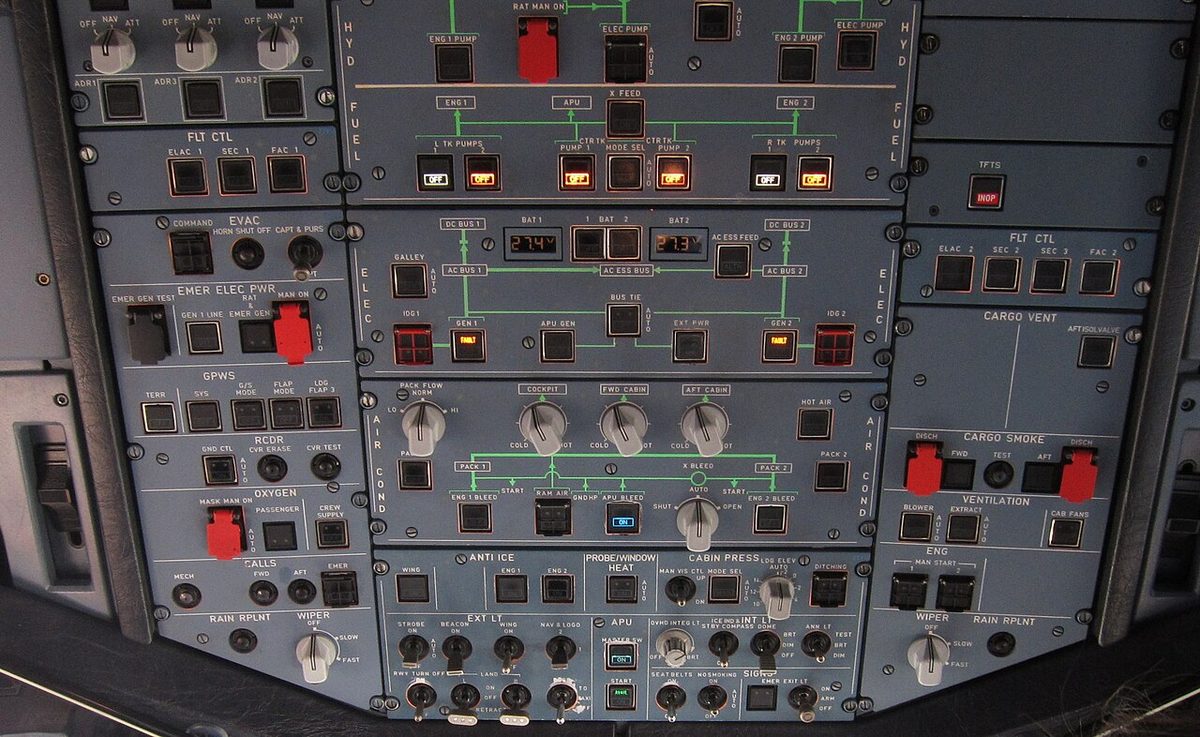
The CALLS panel on the overhead panel lets the flight crew call the cabin and the ground. The buttons fitted vary between aircraft (the one pictured has MECH, FWD, AFT and EMER); the FCOM describes PURS, FWD, MID, EXIT and AFT station keys, ALL, MECH and the guarded EMER.
| Button | Effect in the cabin |
|---|---|
| Station key (PURS, FWD, MID, EXIT, AFT) | Two steady pink lights on that station's area call panel, CAPTAIN CALL with a green light on its attendant indicator panel (AIP), a high-low chime through its loudspeaker |
| ALL | The same at every station |
| EMER (guarded) | Two flashing pink lights on all area call panels, EMERGENCY CALL on all AIPs, three high-low chimes through all loudspeakers |
The ATTND advisory pushbutton, when pressed, shows ON and lights a green light on the attendant area call panel, to tell the cabin crew that take-off or landing is imminent.
Mechanic call (MECH): pressed and held, the MECH button lights a blue COCKPIT CALL light on the external power panel in the nose landing gear bay and sounds an external horn. When it is released the horn stops, but the light stays on until the mechanic presses RESET on that panel. In the other direction, the mechanic's COCKPIT CALL button makes the MECH lights flash amber on the ACPs and sounds a buzzer.
The service interphone, hosted by the CIDS, links the flight crew and the attendant stations with seven service interphone jacks, and the jacks with each other; passengers have no access to it. Ground personnel can use the jacks automatically 10 s after landing, provided the landing gear is locked down; otherwise the SVCE INT OVRD pushbutton on the overhead panel makes them usable.
Area call panels and chimes
Calls from the cabin arrive at the ACPs:
- CAPT key at an attendant station: the ATT lights flash on all ACPs, the CAB transmission key flashes and a buzzer sounds; CAPTAIN appears on that station's AIP.
- Emergency call (EMER CALL): on the cockpit EMER pushbutton the ON light flashes white and the CALL light amber, the ATT lights flash on all ACPs and three buzzers sound in succession.
The buzzers are inhibited during take-off and landing, and the ATT light goes out after 60 s if not reset.
The cabin interphone links the flight crew with the attendants and the attendants with each other. A pilot presses the CAB transmission key, which shows three green lines, and uses the boom, mask or hand microphone; opening the CAB reception knob lights its white integral light and brings in the cabin audio.
The high-low chime marks a call from the cockpit, once for a normal call and three times for an emergency. A low tone chime, depending on the CIDS programming, sounds each time a cabin sign comes on or goes off.
Passenger address and cabin signs
The PA, also hosted by the CIDS, is used by the flight and cabin crew through the boomsets, hand microphones, oxygen mask microphones or the cockpit handset at the bottom of the pedestal. A pilot opens the PA reception knob and presses and holds the PA transmission key, which shows three green lines; no push-to-talk switch is needed. The PA IN USE light comes on whenever the PA is in use, from the cockpit or the cabin, including prerecorded announcements. PA announcements are recorded by the CVR if PA reception is selected on at least one ACP. In an emergency descent the crew announce the descent on the PA, then tell the cabin crew when the aircraft has reached a safe level and cabin oxygen is no longer needed.
The SIGNS panel has a SEAT BELTS switch, which controls the FASTEN SEAT BELT and RETURN TO YOUR SEAT signs, and, depending on the cabin, a NO SMOKING, EXIT or NO PORTABLE ELEC DEVICE switch. Each has three positions: ON, AUTO and OFF. At AUTO the signs come on whenever the landing gear or the slats and flaps are extended. If the cabin altitude exceeds 11,300 ft (±350 ft), all the signs except NO PORTABLE ELEC DEVICE come on whatever the switch positions, and so may the cabin lights. The ECAM shows SEAT BELTS, NO SMOKING, NO PED or NO MOBILE memos while the corresponding signs are on.
Passenger system controls
The passenger systems have their own pushbuttons on the overhead panel, whose fit and location vary with the cabin options:
| Pushbutton | Location | Function |
|---|---|---|
| PAX SYS | Overhead | ON or AUTO: all in-seat power supply units (ISPSUs), in-flight entertainment (IFE) and cabin connectivity powered; OFF: all of them off |
| PAX COM | 45VU or 9020VU | OFF (white light): cabin connectivity cut off |
| MOBILE COM | 45VU | ON: mobile phone system and passenger internet active |
| CINS RESET | 45VU | Resets all cabin connectivity systems |
| PAX PERSONAL ELEC SPLY | 56VU | AUTO: ISPSUs powered except during take-off, landing or decompression, or with the FAP PED power switch off; OFF: all ISPSUs off |
When MOBILE COM is released, its OFF light comes on in white, but the mobile phone system takes about 4 minutes to disconnect and passengers can use their phones meanwhile. The blue DISC IN PROG light stays on until disconnection is complete, and the ECAM memo GSM DISC < 4 MN is replaced by NO MOBILE. An INOP label on PAX PERSONAL ELEC SPLY shows that the in-seat power system has been deactivated.
Cabin connectivity and in-seat power
The cabin connectivity system lets passengers use their mobile phones for voice and data and, where fitted, a wireless internet connection. Mobile phones may not be used in the cockpit or the lavatories. The GSM onboard system may not be used below 3,000 m (about 10,000 ft) above ground level, or in some geographical areas; it detects these conditions and switches itself off.
The In-Seat Power Supply System (ISPSS) feeds the ISPSU outlets at the seats, so that passengers can use portable electronic devices (PEDs). It is disconnected automatically in a rapid decompression. In flight, when only one generator is operating, the main galley, the in-seat power supply and the IFE are shed automatically, and setting the GALLEY pushbutton to OFF removes power from the galleys, the in-seat power supply and the IFE. The flight crew's own devices, such as an electronic flight bag, plug into 110 V, 60 Hz outlets on the lateral consoles; the 115 V, 400 Hz outlets at the rear of the cockpit are for maintenance only.
Evacuation signalling
The CIDS also carries the evacuation alert. The guarded COMMAND pushbutton on the EVAC panel sets it off: in the cockpit EVAC flashes red and, depending on the configuration, a horn sounds, silenced with HORN SHUT OFF; in the cabin EVAC lights flash at the forward and aft attendant panels and the evacuation tone sounds, until silenced with a RESET pushbutton. With the CAPT & PURS / CAPT switch at CAPT & PURS the alert can also be started from the cabin; at CAPT it can be started only from the cockpit, and a cabin command button merely sounds the cockpit horn for 3 s. See emergency evacuation and A320 doors and emergency equipment.
Frequently asked questions
What is the CIDS on the Airbus A320?
The Cabin Intercommunication Data System controls most cabin functions: the cabin and service interphones, the passenger address, the lighted signs, reading lights and general lighting, the evacuation signalling and, where fitted, the lavatory and cargo smoke detection. Two CIDS directors work in parallel, one active and one standby, and send their commands through decoder/encoder units installed along the cabin and near the exit doors.
How does the A320 cockpit call the cabin crew?
The crew press a button on the CALLS panel on the overhead panel. A station key such as FWD or AFT lights two steady pink lights on that station's area call panel, shows CAPTAIN CALL on its attendant indicator panel and sounds a high-low chime. ALL calls every station. The guarded EMER button calls every station with flashing pink lights, an EMERGENCY CALL message and three high-low chimes.
What happens in the A320 cockpit when the cabin crew make an emergency call?
When a cabin attendant presses the EMER CALL key, the ON light of the cockpit EMER pushbutton flashes white and its CALL light flashes amber, the ATT lights flash on all audio control panels and three buzzers sound one after the other. The buzzers, like the one for a normal cabin call, are inhibited during take-off and landing. The cabin crew can also be called back on the cabin interphone.
What do the PAX SYS and MOBILE COM pushbuttons do on the A320?
PAX SYS powers, in ON or AUTO, all the in-seat power supply units, the in-flight entertainment and the cabin connectivity systems, and switches them all off in the OFF position. MOBILE COM controls only the mobile phone system and the passenger internet connection. When it is switched off, the mobile system takes about 4 minutes to disconnect; meanwhile the blue DISC IN PROG light is on and the GSM DISC < 4 MN memo is displayed.
When are passenger power outlets switched off on the A320?
With the PAX PERSONAL ELEC SPLY pushbutton at AUTO, the in-seat power units are powered except during take-off, landing and a decompression, or when the cabin crew have set the PED power switch on the flight attendant panel to OFF. The system is also disconnected automatically in a rapid decompression, and in flight it is shed with the main galley when only one generator is operating.
Test yourself on A320 Cabin Systems and CIDS
The v1prep banks cover this topic in the A320 type-rating bank, with a worked explanation for every answer. EASA ATPL, PPL, IR and CPL, the FAA written tests and A320/B737 type ratings.
Start practising →Sources and further reading
- EASA Easy Access Rules for Air Operations (Regulation (EU) No 965/2012), CAT.IDE.A.175 and CAT.IDE.A.180, crew member interphone and public address systems
- EASA Easy Access Rules for Large Aeroplanes (CS-25), CS 25.1423 Public address system
- 14 CFR 121.318, Public address system
- 14 CFR 121.319, Crewmember interphone system
- 14 CFR 25.1423, Public address system
- EASA Type Certificate Data Sheet EASA.A.064, Airbus A318, A319, A320, A321
Library articles are written for study and exam preparation. They do not replace your aircraft's approved documentation, your operator's procedures or the regulations themselves.