Reading the A320 ECAM: A Practical Guide for Pilots
LAST UPDATED: 24 MAY 2026
The ECAM is the A320's central nervous system — and the source of half the misunderstandings in type-rating training. This guide explains the displays, the colour conventions, what each warning level actually means, the SD pages, and the practical workflow for actioning ECAM correctly when something goes wrong.
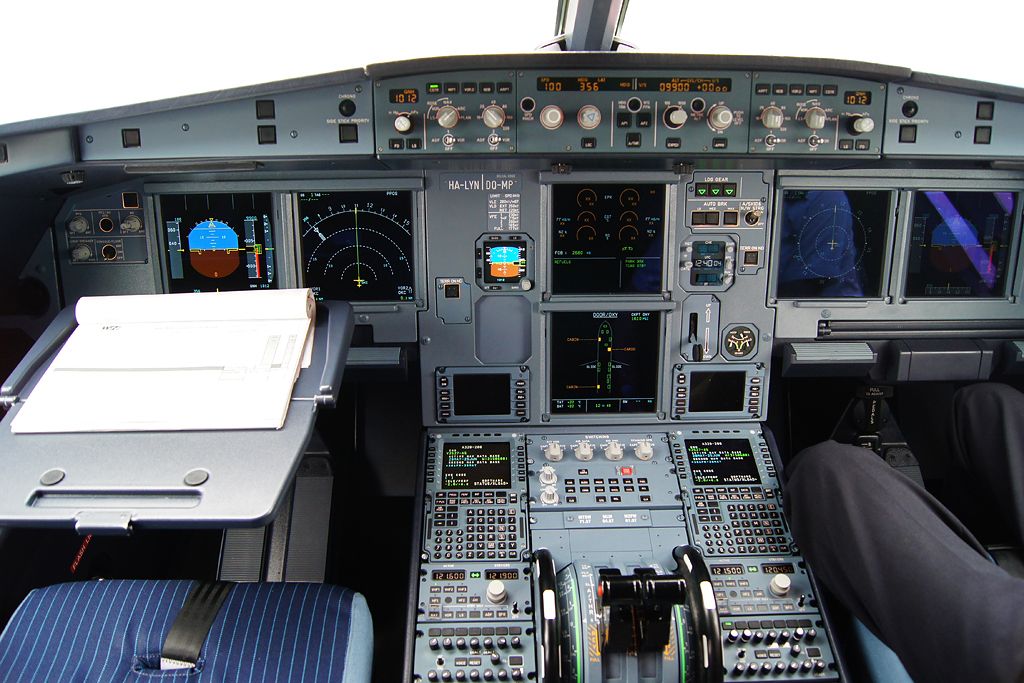
The two ECAM displays
The A320 has two stacked screens for ECAM:
- E/WD (Engine and Warning Display, upper) — Engine parameters at the top (N1, EGT, N2, FF), warning/caution messages in the middle, MEMO list at the bottom. Always shows the active engine page plus messages.
- SD (System Display, lower) — System pages: HYD, ELEC, BLEED, FUEL, F/CTL, APU, COND, DOOR/OXY, WHEEL, ENG, STS. Either auto-displayed for relevant failures or manually selected via SYS pushbuttons on the ECAM control panel.
The two screens work together: the E/WD tells you "something is wrong, take this action," the SD shows the affected system graphically.
Colour conventions
| Colour | Meaning | Example |
|---|---|---|
| Red | Warning — immediate action required, safety of flight affected | FIRE, ENG FAIL, SMOKE, DUAL HYD LO PR |
| Amber | Caution — abnormal, requires action but not immediate | HYD G LO PR, ENG OIL HI TEMP, AC ESS BUS FAULT |
| Green | Normal — system in commanded state, parameter in normal range | Bleed valves green when correctly positioned, IDLE indication green |
| Blue | Procedural action required — pilot needs to do something | Action items in ECAM procedure (e.g. "ENG MASTER OFF") |
| White | Memo / informational — no action needed, just awareness | "SEAT BELTS", "STROBE LT", "GPWS FLAP MODE OFF" |
| Magenta | FMS-commanded value, target speed/altitude | Vapp magenta arrow on PFD, FMA managed mode targets |
The red/amber distinction is the most important. Red means stop everything else and deal with this. Amber means complete current task, then deal with it.
Warning levels
Level 3 — Red Warnings (immediate)
Continuous Repetitive Chime (CRC) + flashing red MASTER WARN light + red text on ECAM. Examples: ENG FIRE, CABIN ALT, GPWS PULL UP, STALL. Action: immediate. Aviate first, then ECAM if appropriate.
Level 2 — Amber Cautions
Single Chime + steady amber MASTER CAUT light + amber text on ECAM. Examples: HYD G LO PR, BLEED FAULT, GPWS TERR. Action: complete current task safely, then run ECAM. Most failures are Level 2.
Level 1 — Advisory
No aural alert, no master light. Amber pulsing parameter on SD page (e.g. oil temperature pulsing amber as it rises). Pre-warning that a parameter is approaching limits. Action: monitor; may escalate to Level 2 if condition worsens.
MEMO
Green or white text in the lower E/WD area. Reminders about active configurations: "SEAT BELTS", "STROBE LT", "ENG ANTI ICE", "APU AVAIL", "AUTO BRK". No action — just awareness of system state.
SD pages
The SD auto-displays a relevant page when a related failure occurs. For example, a bleed failure auto-displays the BLEED page; a hydraulic failure auto-displays the HYD page. The crew can also manually select pages via the SYS pushbuttons.
- ENG — engine parameters, oil, vibration. Auto on engine fault.
- BLEED — pneumatic system, valves, X-bleed. Auto on bleed fault.
- F/CTL — flight control surfaces position, computers, hydraulic supply. Auto on flight control fault.
- HYD — three systems (Green, Yellow, Blue), pump status, reservoir levels.
- ELEC — IDGs, batteries, AC and DC buses, generators.
- FUEL — tank quantities, transfer logic, X-feed valve.
- APU — APU page (when MASTER SW ON until 10 sec after AVAIL).
- COND — air conditioning, cabin temperature, pressurisation.
- DOOR/OXY — door status, slide armed, oxygen pressure.
- WHEEL — landing gear, brakes, tire pressure (some variants).
- STS — status page, persistent items, INOP equipment list.
Actioning ECAM under pressure
Standard ECAM workflow when a failure presents:
- PF flies, PM monitors. First priority is keeping the aircraft under control. Don't dive into ECAM if you're hand-flying through turbulence.
- Identify and silence. PM identifies the message ("ENG 1 FIRE"). Either pilot silences the master warn/caut light.
- Confirm the failure. Cross-check ECAM message against actual indications. False alerts happen — confirm before acting.
- Execute checklist. PM reads each blue action item, PF acknowledges and executes. Standard call-and-response.
- Clear or hold the message. Use CLR pushbutton to clear actioned items. Some items remain (e.g. "LAND ASAP" stays as reminder).
- STS page check. After ECAM is cleared, check STS for persistent items and INOP equipment.
- Briefing. Discuss the consequences with PM — what's lost, what's affected, plan adjustments.
Common ECAM mistakes
- Running ECAM during high-workload phases. Don't run ECAM during rotation, initial climb, or below 1000 ft on approach. Stabilise first.
- Skipping confirmation. Always verify the ECAM message matches actual indications before executing irreversible actions (e.g. shutting an engine).
- Pressing CLR prematurely. Some items are not yet actioned but seem like they could be cleared. Read carefully — blue items are commands, white items are status.
- Ignoring STS page. After ECAM cleared, STS shows what's INOP and any persistent items. Don't skip this — it informs your approach planning.
- Treating MEMO as warnings. White MEMO items aren't faults — they're informational. SEAT BELTS in MEMO doesn't mean anything is wrong.
Drill ECAM scenarios in v1prep
v1prep's question bank covers ECAM warnings, cautions, and the actions for every system across 16,000+ questions.
Practice the full bank →